Blog / Features

Blog

All Features Model Information Local Community Honda CR-V Tips and Tricks Technology Color Options Dealership Information Honda Pilot Honda Civic Honda Accord Honda HR-V Honda Odyssey Just for Fun Honda Ridgeline Service Comparisons Honda Passport Safety Finance Honda Fit Honda Insight Specials Used Cars Parts & Accessories Trade In Avondale Honda Service Earnhardt Honda Service Honda Certified Pre-Owned
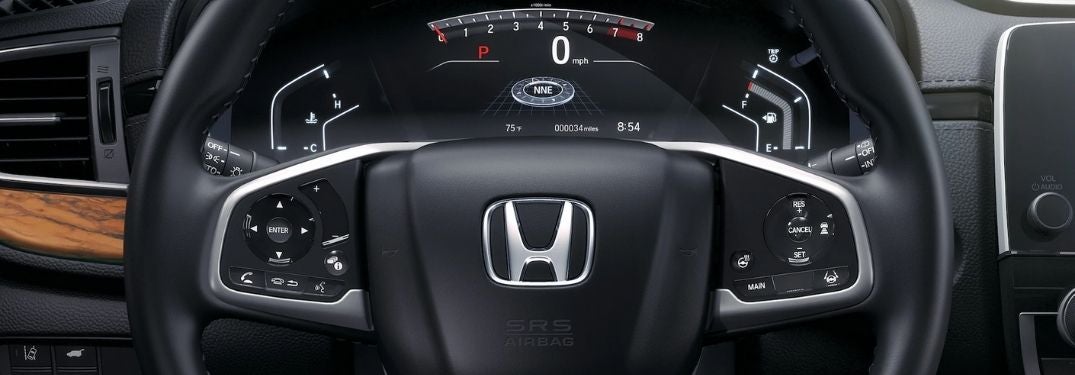
Close Up of 2020 Honda CR-V Steering Wheel and Driver Information Interface

Step-By-Step Instructions to Personalize the Honda Driver Information Interface

How To Customize the Honda Driver Information Interface The Honda Driver Information Interface is an important feature in your 2020 Honda CR-V that will provide you with vital information that includes speed, fuel economy, AWD settings, navigation and more. Honda models equipped with the Driver Information Interface will give you the ability to personalize the display to fit your needs with different apps. Use this quick step-by-step instructional guide to learn how to customize the Honda Driver Information Interface in your Honda. Visit the Earnhardt Honda online inventory today to find a model that fits your lifestyle and budget! more READ MORE: How To Set Up and Use Apple CarPlay and Android Auto in Your Honda How-To Guide to the Honda Driver Information Interface Use Up/Down Arrows to Navigate Driver Information Interface Apps Use the ENTER Button to Select an App Select SETTINGS and Press Enter Select ARRANGE APPS and Press Enter Select the App You Want to Move and Press Enter Use Up/Down Arrows to Move the App and Press Enter

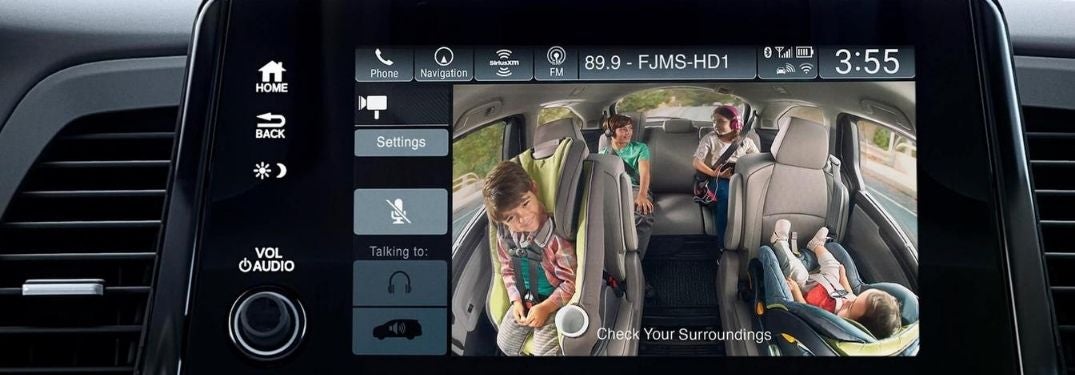
Honda Odyssey CabinWatch on Touchscreen Display

New 2021 Honda Odyssey Features CabinTalk® and CabinWatch® Technology

How Do the Honda Odyssey CabinTalk® and CabinWatch® Features Work? Are you planning your next family adventure? The Honda Odyssey may be the right fit for you and your family. Born and bred for family road trips, the 2021 Honda Odyssey and its predecessors are available with Honda CabinTalk® and Honda CabinWatch® technology that will help parents keep kids in line on family vacations. Avondale-area families interested in the Honda Odyssey may want to know - how do the Honda Odyssey CabinTalk® and CabinWatch® features work? Find out more at Earnhardt Honda! more READ MORE: What Are the Honda Sensing® Safety Features? What Is Honda CabinTalk® and How Does it Work? Have you ever tried to talk to your kids in the third-row seat? It can be a real struggle when they are fighting, yelling or crying. Maybe they are listening to music or watching a video on their iPad? Honda CabinTalk® is a useful feature for families with kids who like to ride in the third row. The Honda CabinTalk® feature allows you to utilize Bluetooth voice-command technology and an in-car PA system to project parental commands via the Honda Odyssey speaker system, Honda wireless headphones and wired headphones in the third row. When the Honda Odyssey Blu-ray Rear Entertainment System or Honda streaming apps are in use, Honda CabinTalk® will pause the program while you communicate with your kids. What Is Honda CabinWatch® and How Does it Work? Have you ever wondered what kind of shenanigans your kids are up to in the third row? Do you want to know if your kids are asleep? Honda CabinWatch® is an innovative feature that will give you the answers you are looking for and will allow you to monitor your children. Honda CabinWatch® employs a ceiling-mounted and centrally located camera that provides an overhead view of the Honda Odyssey rear seats. Use the Display Audio touchscreen and tap the CabinWatch® icon for an unobstructed view of the rear seats with a zoom function. CabinWatch® will allow you to see children in rear-facing car seats and ensure that all of your passengers are wearing their seatbelts at the touch of a button. Infrared LEDs will allow you to check on your kids at night when the cabin is dark. READ MORE: How To Connect to the Honda Wi-Fi Hotspot How do the Honda Odyssey CabinTalk® and CabinWatch® features work? Find out how family-friendly features like Honda CabinTalk® and Honda CabinWatch® can help you enjoy your next road trip with this overview. Visit the Earnhardt Honda online inventory today to find a Honda Odyssey equipped with CabinTalk® and CabinWatch®!

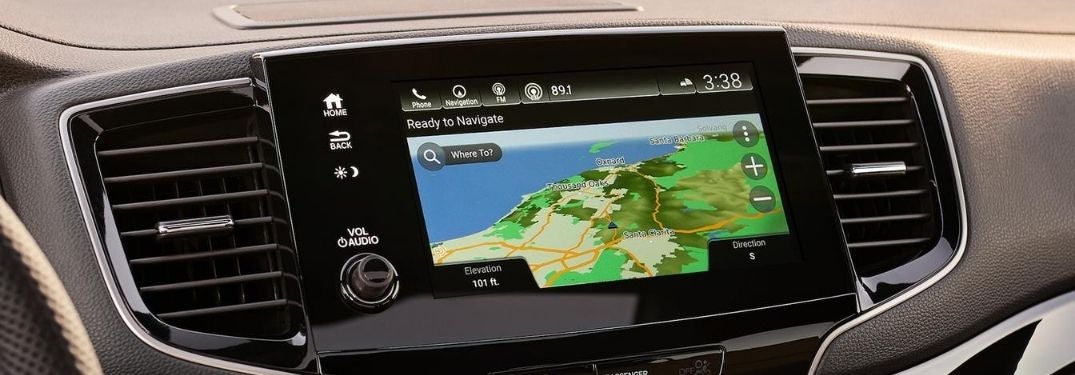
Close Up of 2020 Honda Passport Display Audio Navigation

Step-By-Step Instructions To Use Navigation Features in Your Honda

How To Use Display Audio Navigation in Your Honda Are you planning a family road trip? Accurate navigation is a key to any adventure and 2020 Honda CR-V models equipped with Display Audio and a built-in satellite-linked navigation system will help you find your destination. Adventurers who are new to the Honda brand may want to learn how to use Display Audio Navigation in their Honda with this step-by-step guide created by Earnhardt Honda. Explore the Earnhardt Honda online inventory today to find a Honda car, truck or crossover equipped with Honda satellite-linked built-in navigation! more READ MORE: How To Use the Honda Wi-Fi Hotspot How To Set a Destination with Honda Navigation Press the Navigation Icon on the Display Audio Touchscreen Press WHERE TO Enter the Desired Address in the Search Bar Select D ONE and G O to Start Navigation How To Find a Destination with Honda Navigation Select the Categories Icon in the Navigation Menu Choose Your Desired Category – Restaurants, Shopping, Gas Stations Etc. Select a Subcategory and Find Your Desired Destination How To Use Honda Navigation Voice Commands Press the Talk Button on the Steering Wheel Say NAVIGATION and FIND ADDRESS Say the Street Address, City and State Say the Number by the Desired Location on the Touchscreen Display Say GO to Begin Navigation

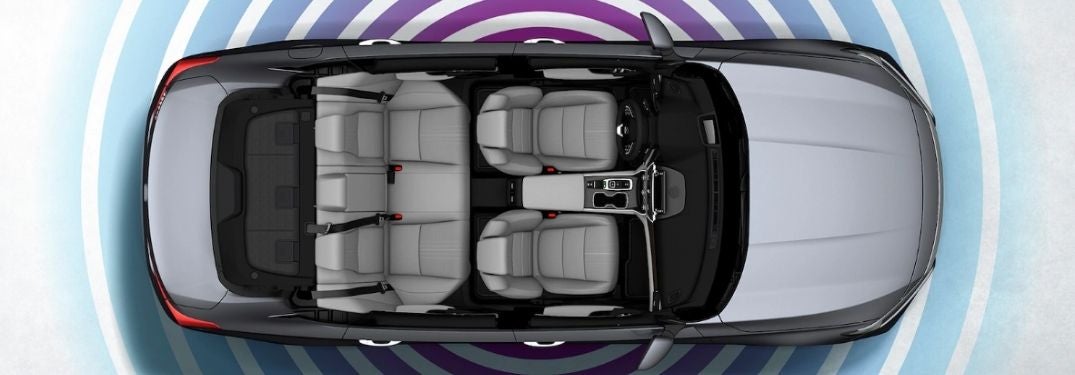
Overhead View of 2020 Honda Accord with Wi-Fi Signal Graphic

Step-By-Step Instructions to Set Up and Use the Honda Wi-Fi Hotspot

How To Connect to the Honda Wi-Fi Hotspot Did you know that select Honda models are available with an integrated Wi-Fi Hotspot? Avondale-area drivers with an AT&T data plan will gain access to a Wi-Fi Hotspot in select Honda trim levels. Families interested in access to onboard Wi-Fi can learn how to connect to the Honda Wi-Fi Hotspot with this step-by-step guide created by Earnhardt Honda. Explore our Phoenix Honda online inventory today to find a Honda car, truck, SUV or crossover with a Wi-Fi Hotspot!  WiFi access depends on the model year and trim level if shopping certified preowned Hondas be sure to ask which editions have it. A subscription is needed for WiFi to be active. Many 2024 Hondas come with a 3-month subscription to get you started. more READ MORE: How To Use Apple CarPlay™ and Android Auto™ in Your Honda How-To Guide to Honda Wi-Fi Mode Press the Home Button on the Touchscreen Display Select Settings Select Connections Select Wi-Fi Select Change Mode Choose Network or Hotspot Confirm Network or Hotspot Selection Select Network Options or Hotspot Options to Change Settings Select Connect Enter the Password for the Access Point

Bronze 2020 Honda Accord with City Skyline in the Background

2020 Honda Accord Features Honda Sensing® Safety Systems and Technology

What Are the 2020 Honda Accord Technology and Safety Features? Technology has become a primary focus of automakers with innovative safety systems, touchscreen infotainment technology and high-tech features that will upgrade your day-to-day ride. The 2020 Honda Accord is a fan favorite at Earnhardt Honda that is loaded with innovative technology. Drivers interested in the Honda Accord want to know – what are the 2020 Honda Accord technology and safety features? more READ MORE: What Are the Honda Sensing® Safety Features? Honda Sensing® Safety Systems Honda Sensing® is a suite of advanced driver-assistance systems that will help keep Avondale-area families safe on the road. The 2020 Honda Accord comes standard with Honda Sensing® technology that will add a Collision Mitigation Braking System™, a Road Departure Mitigation System, a Lane Keeping Assist System, Adaptive Cruise Control and Traffic Sign Recognition to the spec sheet. 8-Inch Display Audio Touchscreen Infotainment System Families who opt for the Honda Accord Sport, EX, EX-L and Touring trim levels will find an innovative 8-inch Display Audio touchscreen infotainment system. Equipped with Display Audio technology, the Honda Accord adds access to Apple CarPlay™ and Android Auto™ smartphone integration that will help keep you connected on family adventures. HondaLink® App No matter where you are, you can stay connected to your Honda Accord with the innovative HondaLink® app on your phone. Download HondaLink® on your smartphone and you will have remote access to your Honda that allows you to lock and unlock doors, check your fuel levels, start your Accord and much more. Wi-Fi Hotspot Wi-Fi is a key element of connectivity and the 2020 Honda Accord Touring trim level will help with an available on-board Wi-Fi Hotspot that is provided by AT&T. Drivers with an AT&T data plan who buy or lease a Honda Accord Touring will have access to the in-car Wi-Fi Hotspot that will help you stay connected at every turn. READ MORE: How To Use Apple CarPlay™ and Android Auto™ in Your Honda Are you looking for technology that will keep you safe and keep you connected on the road? The 2020 Honda Accord may be the right fit. This overview will help answer the question – what are the 2020 Honda Accord technology and safety features – with a list of high-tech highlights. Find a Honda Accord that fits your lifestyle and budget today when you visit the Earnhardt Honda online inventory!

Blue 2020 Honda CR-V in a Bridge Tunnel

Step-By-Step Instructions for Honda Sensing® Adaptive Cruise Control

How To Set and Use Honda Sensing® Adaptive Cruise Control Did you know that your Honda CR-V is equipped with Honda Sensing® safety systems? Adaptive Cruise Control is an element of the suite of Honda Sensing® systems that will allow you to set a speed and follow distance in traffic that is easy to adjust via controls on the steering wheel. Adaptive Cruise Control will monitor and automatically adjust the following distance at the set speed. Learn how to set and use Honda Sensing® Adaptive Cruise Control with this step-by-step guide. Find a Honda model equipped with Honda Sensing® and Adaptive Cruise Control today when you visit the Earnhardt Honda inventory! more READ MORE: What Are the 2020 Honda CR-V Safety Systems and Features? How-To Guide to Honda Sensing® Adaptive Cruise Control Press the MAIN Button on the Steering Wheel Press the SET/- Button When You Reach the Correct Speed Press the RES/+ and SET/- Buttons to Adjust Speed Up/Down by 1 MPH Press and Hold RES/+ and SET/- Buttons to Adjust Speed Up/Down by 5 MPH Press the Interval Button on the Steering Wheel to Adjust Following Distance Press CANCEL or MAIN to Cancel Adaptive Cruise Control

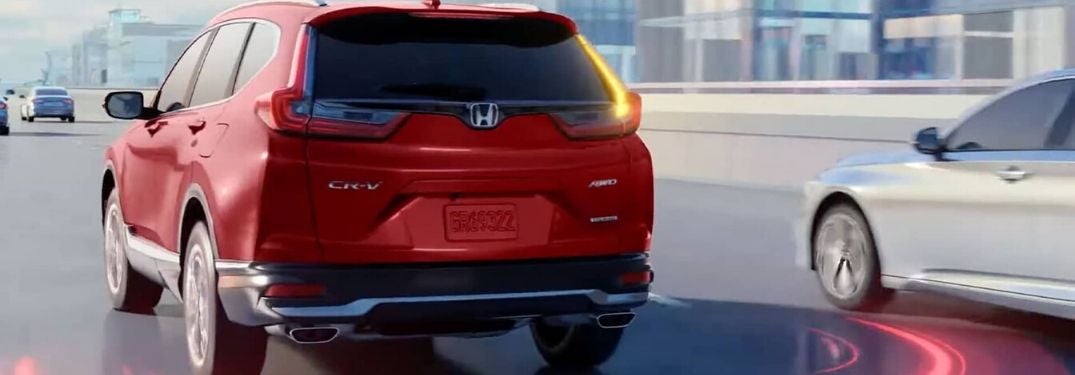
Red 2020 Honda CR-V on Freeway with Illustration of Rear Blind Spot Monitor

Safety Highlights the 2020 Honda CR-V with Honda Sensing® Systems and More

What Are the 2020 Honda CR-V Safety Systems and Features? Gear up for your next family road trip and get behind the wheel of the 2020 Honda CR-V at Earnhardt Honda. A popular compact crossover, the Honda CR-V is loaded with features that cater to your family. When families hit the road in the Valley of the Sun, safety is a top priority and many car shoppers want to know – what are the 2020 Honda CR-V safety systems and features? Take a closer look at how the 2020 Honda CR-V will keep you safe! more READ MORE: Available 2020 Honda CR-V Interior and Exterior Color Options? Standard Honda Sensing® Safety Systems Families who opt for the 2020 Honda CR-V will find standard Honda Sensing® safety technology in all trim levels. Honda Sensing® is a key element of safety and will add a Collision Mitigation Braking System™ with Forward Collision Warning, a Road Departure Mitigation System, Adaptive Cruise Control with Low-Speed Follow and a Lane Keeping Assist System. Armed with these intelligent safety systems, the Honda CR-V will help keep families safe. To upgrade your safety, the 2020 Honda CR-V is available with an impressive list of active and passive safety systems that will help provide you with peace of mind. Here is a quick breakdown of a few of the top safety features that you may find when you get behind the wheel of the Honda CR-V. Multi-Angle Rearview Camera Honda CR-V models come standard with a Multi-Angle Rearview Camera that will allow you to check your surroundings when you are backing out of the driveway. Not your run-of-the-mill backup camera, the Multi-Angle Rearview Camera will provide drivers with three angles to choose from – Normal, Top-Down and Wide. Blind Spot Information System with Cross Traffic Monitor The Blind Spot Information System with Cross Traffic Monitor is a standard feature for Honda CR-V EX, EX-L and Touring trim levels. A suite of sensors located in the rear bumper make up the Blind Spot Information System and will monitor traffic and alert you when a vehicle is in your blind spot. Cross Traffic Monitor will detect vehicles approaching from the side when you are in reverse – perfect for when you are in a crowded parking lot. Automatic LED Headlights Honda CR-V Touring trim levels will amp up your safety with automatic LED headlights. With this feature, you will not have to worry about remembering to turn your lights on when it starts to get dark. This feature will automatically turn on your headlights as the sun starts to go down. Rain-Sensing Windshield Wipers Do you have a hard time finding the right speed for your windshield wipers when it rains? Available rain-sensing windshield wipers will help eliminate that risk with technology that will sense the amount of rainfall on your windshield and adjust the wiping frequency to match the severity of the weather. Rain-sensing windshield wipers allow you to keep your eyes on the road in bad weather. READ MORE: What Are the 2020 Honda CR-V Hybrid Engine and MPG Specs? Are you looking for a safe, family-friendly crossover? The Honda CR-V may fit the bill and you may want to know – what are the 2020 Honda CR-V safety systems and features? Visit the Earnhardt Honda inventory to find a Honda car, truck or crossover with innovative features that will help keep you safe!

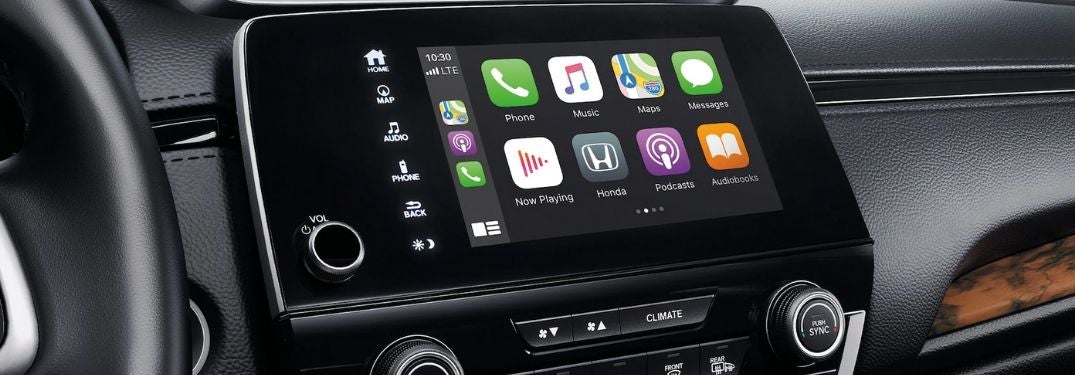
Close Up of Apple CarPlay in a 2020 Honda CR-V

Step-By-Step Instructions to Set Up and Use Apple CarPlay™ and Android Auto™ in a Honda

How To Use Apple CarPlay™ and Android Auto™ in Your Honda Are you and your family new to the Honda brand? Are you still learning how to use all of the features and technology in your 2020 Honda CR-V? Earnhardt Honda is here to help. Available with Apple CarPlay™ and Android Auto™ smartphone integration, many Honda models can keep you connected to your favorite mobile apps, media and services via the Honda Display Audio touchscreen display when equipped. Learn how to use Apple CarPlay™ and Android Auto™ in your Honda with this step-by-step guide. Search the Earnhardt Honda online inventory today to find a Honda model equipped with Apple CarPlay™ and Android Auto™! more How To Connect to Honda Display Audio with Bluetooth Step-By-Step Instructions to Use Apple CarPlay™ in Your Honda Update Your Apple iPhone Software Connect Your iPhone to the Display Audio System via an Apple-Approved Cable Start Your Honda and Access the Display Audio Home Screen Choose – Enable Once, Always Enable or Cancel Select the Apple CarPlay™ Menu Press and Hold the TALK Button to Use Siri® Voice Commands Use the Apple CarPlay™ Menu to Make Phone Calls, Access Apple Maps and More Step-By-Step Instructions to Use Android Auto™ in Your Honda Update Your Smartphone Software Download the Android Auto™ App on Your Smartphone Pair Your Smartphone with Bluetooth® HandsFreeLink Connect Your Smartphone to Display Audio with a USB Cable Start Your Honda and Access the Display Audio Home Screen Choose – Enable Once, Always Enable or Cancel Complete the Android Auto™ Tutorial Access the Android Auto™ Home Screen Press and Hold the TALK Button to Use Google Assistant Use the Android Auto™ Menu to Access Phone, Text, Media and Navigation

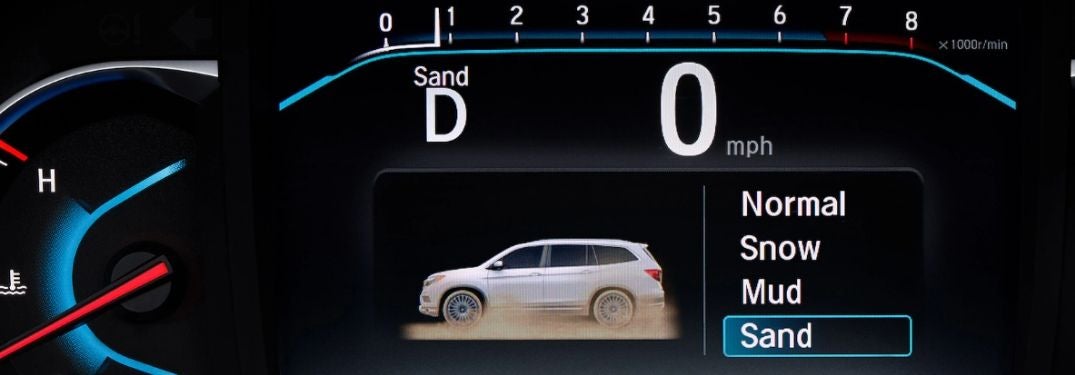
Close Up of Honda Pilot Information Display with Intelligent Traction Management Terrain Modes

Step-By-Step Instructions To Use Honda Intelligent Traction Management

How To Use the Honda Intelligent Traction Management System Gear up for your next family adventure in a new Honda Pilot equipped with Real Time AWD™ and the Intelligent Traction Management System. Armed with Intelligent Traction Management, you can tailor performance to the terrain with a trio of driver-selectable terrain modes – Snow, Mud and Sand – in Honda Pilot AWD models. Front-wheel drive Honda Pilot models provide drivers with Snow Mode. Learn how to use the Honda Intelligent Traction Management System in your Honda vehicle with this step-by-step guide created by Earnhardt Honda and a how-to video supplied by Honda. Visit the Earnhardt Honda inventory today to find a Honda car, truck or crossover equipped with Intelligent Traction Management! more What Are the Honda Sensing™ Safety Features and Systems? Step-By-Step Instructions for Honda Intelligent Traction Management Put Your Honda Vehicle in Park Press the Snow Button on the Center Console (2WD Models) Press the Honda Vehicle Icon Button on the Center Console (AWD Models) Press the Button on the Center Console to Cycle Modes Selected Drive Modes Will Appear on the Driver Information Interface Terrain Modes Remain Engaged Until a Different Mode is Chosen or the Vehicle Restarts https://www.youtube.com/watch?time_continue=5&v=-GwniNBnxjY&feature=emb_logo

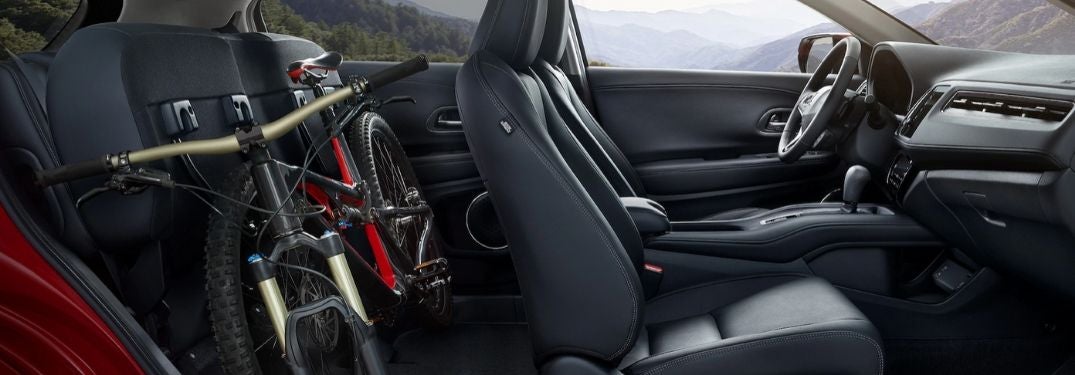
Cutaway View of 2020 Honda HR-V Interior with 2nd Row Magic Seat Up and Bike in Backseat

Tips and Tricks to Use the Honda Magic Seat® in Your Honda HR-V

How To Use the 2 nd -Row Honda Magic Seat® The Honda Magic Seat® in your 2020 Honda HR-V or 2020 Honda Fit is a key feature for many families in the Phoenix area. With the 2 nd -row Magic Seat®, you will have the ability to configure the Honda HR-V interior to fit your needs with three cargo modes – Long Mode, Tall Mode and Utility Mode – that will each serve its own purpose. Long Mode will accommodate cargo up to 8-feet long, Utility Mode provides 58.8 cubic feet of cargo space in the Honda HR-V and Tall Mode provides 4-feet of vertical space. Learn how to use the 2 nd -row Honda Magic Seat® with this quick guide by Earnhardt Honda. Find a Honda equipped with the Magic Seat® today when you visit the Earnhardt Honda inventory! more READ MORE: How Far Can You Drive Your Honda with the Low Fuel Light On? Step-By-Step Instructions To Use the Honda Magic Seat® Release and Store the Center Seat Belt Secure the Seat Belt in the Holder Located on the Ceiling Lower Head Rests All the Way Use Seatback Release Levers to Lower the Seatback Lift the Seat Cushions Up for More Vertical Space

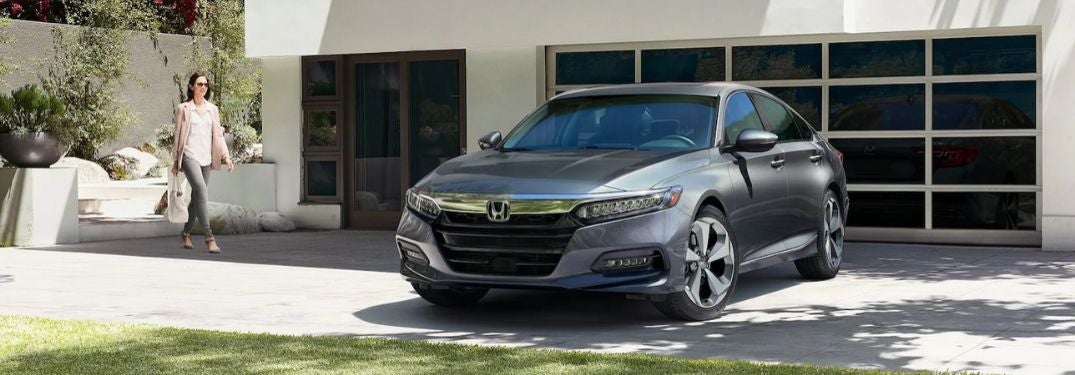
Gray 2020 Honda Accord in Driveway with Woman

Step-By-Step Instructions to the Honda Accord Smart Entry with Walk Away Auto Lock® Feature

How Does Honda Smart Entry with Walk Away Auto Lock® Work? Add convenience to your day-to-day commute with the available Honda Smart Entry with Walk Away Auto Lock® feature. When equipped with this feature, Smart Entry with Walk Away Auto Lock® will allow you to lock, unlock and start your 2020 Honda Accord without ever taking your Honda key fob out of your pocket or purse. Walk Away Auto Lock® capabilities are accessible via the Display Audio touchscreen infotainment system and will automatically unlock your car doors when you get within eight feet and will automatically re-lock the doors when you leave that eight-foot area. Learn how to use this feature and get answers to the question – how does Honda Smart Entry with Walk Away Auto Lock® work – with this quick how-to guide and video. Visit the Earnhardt Honda inventory today to find a Honda car, truck or crossover equipped with the Smart Entry with Walk Away Auto Lock® feature! more READ MORE: How To Connect Honda Display Audio with Bluetooth How To Set Up Honda Walk Away Auto Lock® Put Your Honda in Park Select Settings on the Display Audio Home Screen Select Vehicle and Door/Window Setup Select Walk Away Auto Lock® Toggle Walk Away Auto Lock® to ON Select Save

Black and White Photo of Flat Tire with White How To Reset the Honda TPMS Warning Light Text

Step-By-Step Instructions To Reset the Honda Tire Warning Light (TPMS)

Your Tire Pressure Monitoring System is a valuable tool, but only if you pay attention when the Honda TPMS Warning Light comes on. When the tire light alerts you to low tire pressure – you will need to address the problem and reset the light. Please remember that the tire pressure sensors are not a substitute for checking your tire pressure regularly. It won’t light up unless the problem is becoming serious. Underinflated tires can be a safety hazard. more Troubleshooting the Tire Pressure Monitoring System Here’s some good information that may answer some of your questions about TPMS and your tire warning light. Please be aware that Honda Tire Pressure Monitoring Systems vary, depending on the model type and model year.  Furthermore, TPMS systems are not uniform across the spectrum of car brands. In addition, the technology changes from time to time, meaning that older models may not have the same capability found on new ones. If in doubt, please contact your Earnhardt service advisor. When Does the TPMS Light Come On? The tire pressure light isn’t required to come on until the tire is 25 percent below recommendations. Therefore, you should never ignore it. The manufacturer’s recommended air pressure is in your owner s manual. What if the TPMS Light Came On For a Few Minutes and Turned Itself Off? The most likely trigger is cold.  Tire pressure drops about 1 psi with every ten degree drop in cold weather.  As your tires heat up, the pressure stabilizes. That’s why there are winter and summer standards for properly inflated tires. However, with our Phoenix AZ climate, an inaccurate TPMS light should be reported to your Earnhardt Honda service center to make sure it is operating accurately. What if I filled the tire, but the sensor didn’t reset? Try driving the vehicle at over 28 miles per hour for a few minutes. At that speed, the TPMS will get little or less interference from other sensors and radio frequencies. This allows it to update through the serial data bus, sending the proper tire information to the TPMS sensor. If it never resets, talk to an expert at your Earnhardt Honda service center to find out why. What if I reset the TPMS light, but now it’s flashing? According to the National Highway Traffic Safety Administration, systems may flash or stay on longer to indicate a problem with the TPMS system rather than the tire.  After checking that your tires have the proper pressure, you may need a mechanic to read the code and tell you what’s happening. Does TPMS Read my Spare Tire? The spare tire does not have a sensor for the TPMS system to read. The system may register nothing where the tire should be.  As long as you are confident that the spare has the correct tire pressure, it should not represent a problem. Why Can’t I See That My Tire is Low? Unfortunately, human eyesight cannot detect that a tire is low until the problem is really severe.   Your manufacturer’s recommended pressure is in your owner s manual. Can I Disconnect the Battery to Clear the TPMS Sensor? Some people try to clear codes by disconnecting the battery. Generally the system saves all codes and doesn’t reset them just because the battery is removed.  This is actually a fail-safe feature because mechanics need those codes to determine what is wrong with a vehicle. What if I clear the code before my mechanic has a chance to read it? If you are able to clear the TPMS code, you will be overwriting it with a new code.  Unless the system triggers the sensor again, your mechanic will not find the important code. So it is best not to clear codes until a highly qualified Honda mechanic has a chance to determine what's happening. Why is Tire Pressure So Important? According to the automotive journalists at Edmunds, a mere 5 PSI can cause a tire to fail. An underinflated tire generates heat as it struggles to keep up with the job it has to do.  This causes faster degeneration. Furthermore, an underinflated tire affects the accuracy of steering and handling. Thus, the vehicle declines in performance and fuel economy. If a tire blows, it can lead you to have a one-car accident. Even worse, it could be a multi-car accident if you are in busy traffic. What is Direct vs. Indirect TPMS? Direct TPM sensors are attached to the valve for the most accurate reading. With indirect TPMS, the anti-lock brake system assists in determining approximate pressure. Although a good system, it is not as fast as a direct system. Does My Old Car NOT Have Tire Pressure Monitoring? Starting with the 2008 model year, every Honda has TPMS. All cars made before the 2018 probably don't have this feature. If you don’t have a light to turn on and warn you, it’s all the more important to carry a gauge to check and add air as needed. Explore the Earnhardt Honda inventory today to find a new or certified preowned Honda car, truck or crossover with TPMS! How To Reset the Honda Tire Pressure Monitoring System TPMS Warning Light Learn how to reset the tire warning light with this step-by-step guide and get back to normal. Instructions To Reset the Honda TPMS Warning Light Check the Tire Pressure in All Tires Fill With Air or Replace Tires as Needed Keep Your Honda in Park and Start the Vehicle Find the Honda TPMS Button to the Left of the Steering Column Press and Hold Until the TPMS Warning Light Blinks Twice Honda TPMS Will Begin to Re-Calibrate If There is No TPMS Button – Select Vehicle Settings on the MID Screen Press the Select/Reset Button Select TPMS Calibration Select Calibrate


Contact Us

Fill out this form below and we'll contact you shortly
*Required Fields